
When building a fintech application with React Native, there comes a point where JavaScript alone isn't enough. Sensitive operations like cryptographic key exchange, data encryption, and network security checks demand the performance and security guarantees that only native code can provide. In this post, we walk through the custom native modules we built for Streak — a React Native card and payments app — and why we chose to go native for these critical features.
Why Native Modules?
React Native's bridge architecture lets JavaScript talk to platform-native code. For most UI and business logic, JavaScript works fine. But for operations involving:
- Cryptographic key generation and exchange (ECDH)
- AES encryption/decryption of API payloads
- Wi-Fi network security detection
...we needed to drop down to native. The reasons are straightforward:
- Access to platform crypto libraries — BouncyCastle on Android, CommonCrypto and CryptoKit on iOS — that have been battle-tested for years.
- Performance — Crypto operations on large payloads are significantly faster in native code.
- Security — Keeping key material in native memory reduces exposure compared to passing it through the JS bridge unnecessarily.
Module 1: CryptoReactNative (Android — Kotlin)
This is the core encryption module on the Android side. It implements ECDH (Elliptic Curve Diffie-Hellman) key agreement followed by AES symmetric encryption — a classic pattern for establishing secure communication channels.
What It Does
| Method | Purpose |
|---|---|
generateKeys() | Generates an EC key pair on the prime256v1 curve and returns the public and private keys as hex strings |
encryptData() | Takes the server's public key and the local private key, performs ECDH key agreement to derive a shared secret, then AES-encrypts the payload |
decryptData() | Reverse of encryption — derives the same shared secret and AES-decrypts the response |
getGuid() | Generates a UUID for unique request identification |
How It Works
The encryption flow follows a well-known pattern:
1. Client generates an EC key pair (prime256v1)
2. Client sends its public key to the server
3. Server responds with its own public key
4. Both sides independently compute the same shared secret via ECDH
5. That shared secret becomes the AES key for encrypting/decrypting payloads
Here's the key agreement in Kotlin:
val ecSpec = ECNamedCurveTable.getParameterSpec("prime256v1")
val point = ecSpec.curve.decodePoint(decodeHexString(serverPublicKey))
val pubSpec = ECPublicKeySpec(point, ecSpec)
val publicKey = kf.generatePublic(pubSpec)

val keyAgreement = KeyAgreement.getInstance("ECDH")
keyAgreement.init(privateKey)
keyAgreement.doPhase(publicKey, true)
val secretKey = keyAgreement.generateSecret("ECDH")
Once we have the shared secret, encryption is standard AES/CBC:
val cipher = Cipher.getInstance("AES/CBC/PKCS5Padding")
val ivSpec = IvParameterSpec(ByteArray(16))
cipher.init(Cipher.ENCRYPT_MODE, secretKey, ivSpec)
val resultData = cipher.doFinal(param.toByteArray(StandardCharsets.UTF_8))
The module uses BouncyCastle as the security provider for EC operations and SpongyCastle for ASN1 parsing of public key bytes.
Module 2: ECDHJavaAlgorithm (Android — Java)
This is a Java implementation of the same ECDH + AES pattern. It serves as the decryption counterpart, exposing a decryptData method to JavaScript via @ReactMethod.
Why Two Modules?
During development, we started with the Java version and later migrated the primary flow to Kotlin. The Java module was kept for backward compatibility with certain decryption flows. Both modules are registered in the AppPackage and available on the JS side:
public List<NativeModule> createNativeModules(ReactApplicationContext reactContext) {
    List<NativeModule> modules = new ArrayList<>();
    modules.add(new CryptoReactNative(reactContext));
    modules.add(new ECDHJavaAlgorithm(reactContext));
    modules.add(new InsecureNetworkCheck(reactContext));
    return modules;
}
The decryption flow mirrors the Kotlin version — ECDH key agreement to derive the shared secret, then AES/CBC/PKCS7 to decrypt the Base64-encoded ciphertext.
Module 3: CryptoReactNativeIOS (iOS — Swift)
The iOS counterpart uses Apple's own crypto stack. Instead of BouncyCastle, we use CommonCrypto (via the CC.EC wrapper from SwCrypt) and CryptoSwift for AES operations.
Key Differences from Android
- Key generation uses
CC.EC.generateKeyPair(256)— a one-liner that returns a tuple of(privateKey, publicKey)asDataobjects. - Shared secret computation uses
CC.EC.computeSharedSecret()instead of Java'sKeyAgreement. - AES encryption is handled via a
Stringextension using CryptoSwift:
extension String {
  func aes_Encrypt(AES_KEY: [UInt8]) -> String {
    let iv: [UInt8] = Array(repeating: UInt8(0), count: 16)
    let aes = try AES(key: AES_KEY, blockMode: CBC(iv: iv), padding: .pkcs7)
    let encrypted = try aes.encrypt(Array(self.utf8))
    return encrypted.toBase64()
  }
}
- Constants export — the iOS module exports generated keys and a UUID as constants via
constantsToExport(), making them available immediately when the module loads.
The Bridge File
Since the module is written in Swift, we need an Objective-C bridge file (CryptoReactNativeIOSBridge.m) to expose it to React Native:
@interface RCT_EXTERN_MODULE(CryptoReactNativeIOS, NSObject)

RCT_EXTERN_METHOD(
  encrypt:(NSString *)valueToEncrypt
  serverPublicKey:(NSString *)serverPublicKey
  privateKey:(NSString *)privateKey
  resolve:(RCTPromiseResolveBlock)resolve
  rejecter:(RCTPromiseRejectBlock)reject
)

RCT_EXTERN_METHOD(
  decrypt:(NSString *)valueToDecrypt
  serverPublicKey:(NSString *)serverPublicKey
  privateKey:(NSString *)privateKey
  resolve:(RCTPromiseResolveBlock)resolve
  rejecter:(RCTPromiseRejectBlock)reject
)
@end
This is a necessary ceremony with React Native's legacy bridge — Swift modules cannot be directly discovered by the bridge, so we declare the method signatures in Objective-C.
Module 4: InsecureNetworkCheck (Android — Java)
Security isn't just about encryption — it's also about the transport layer. This module checks whether the user's current network connection is secure before allowing sensitive operations.
What It Checks
Wi-Fi connected?
  ├── Yes → Check SupplicantState
  │         ├── COMPLETED (authenticated) → "secured"
  │         └── UNINITIALIZED (open network) → "unsecured"
  └── No → Cellular?
            ├── Yes → "secured"
            └── No → reject("NO_NETWORK")
The implementation uses Android's ConnectivityManager and WifiManager:
@ReactMethod
public void checkNetworkSecurity(Promise promise) {
    ConnectivityManager cm = (ConnectivityManager) getReactApplicationContext()
        .getSystemService(Context.CONNECTIVITY_SERVICE);
    Network network = cm.getActiveNetwork();
    NetworkCapabilities capabilities = cm.getNetworkCapabilities(network);

    if (capabilities.hasTransport(NetworkCapabilities.TRANSPORT_WIFI)) {
        WifiManager wifiManager = (WifiManager) getReactApplicationContext()
            .getApplicationContext().getSystemService(Context.WIFI_SERVICE);
        WifiInfo wifiInfo = wifiManager.getConnectionInfo();
        boolean isSecure = wifiInfo.getSupplicantState() == SupplicantState.COMPLETED;

        promise.resolve(isSecure ? "secured" : "unsecured");
    } else if (capabilities.hasTransport(NetworkCapabilities.TRANSPORT_CELLULAR)) {
        promise.resolve("secured");
    }
}
This lets the app warn users or block transactions when they're on an open Wi-Fi network — a meaningful layer of defense for a payments app.
Using the Modules from JavaScript
On the JS side, the modules are accessed through NativeModules with platform-specific branching:
import { NativeModules, Platform } from "react-native";

const { CryptoReactNative } = NativeModules;
const { CryptoReactNativeIOS } = NativeModules;

// Encrypting a payload
const encrypted =
  Platform.OS === "ios"
    ? await NativeModules.CryptoReactNativeIOS.encrypt(
        JSON.stringify(data),
        serverPublicKey,
        privateKey,
      )
    : await CryptoReactNative.encryptData(
        serverPublicKey,
        privateKey,
        JSON.stringify(data),
      );
Note the subtle difference in parameter order between platforms — encryptData on Android takes (serverKey, privateKey, value) while encrypt on iOS takes (value, serverKey, privateKey). This is an artifact of each platform's conventions and the order in which the bridge file declares parameters.
Lessons Learned
1. BouncyCastle vs SpongyCastle on Android
Android bundles a stripped-down version of BouncyCastle. For full EC support, we had to add the complete BouncyCastle provider at runtime (Security.addProvider(new BouncyCastleProvider())). We also used SpongyCastle for ASN1 parsing because of classloader conflicts with the system provider.
2. Swift + React Native requires a bridge file
Every Swift native module needs a corresponding .m file with RCT_EXTERN_MODULE and RCT_EXTERN_METHOD declarations. This is boilerplate, but forgetting it means the module silently doesn't exist on the JS side.
3. Hex encoding is everywhere EC public keys are exchanged as hex strings between client and server. We had to implement hex encode/decode utilities on both platforms. Getting these wrong (off-by-one errors, incorrect nibble ordering) produces silent failures where keys just don't match.
4. Keep method signatures consistent across platforms Having different parameter orders between iOS and Android created confusion. If we were starting over, we'd define a unified TypeScript interface first and make both native implementations match it exactly.
5. Zero IV is a conscious trade-off Both platforms use a zero-filled 16-byte IV for AES/CBC. In our case, each ECDH key agreement produces a unique shared secret (and therefore unique AES key) per session, so the zero IV doesn't compromise security — but it's worth documenting why.
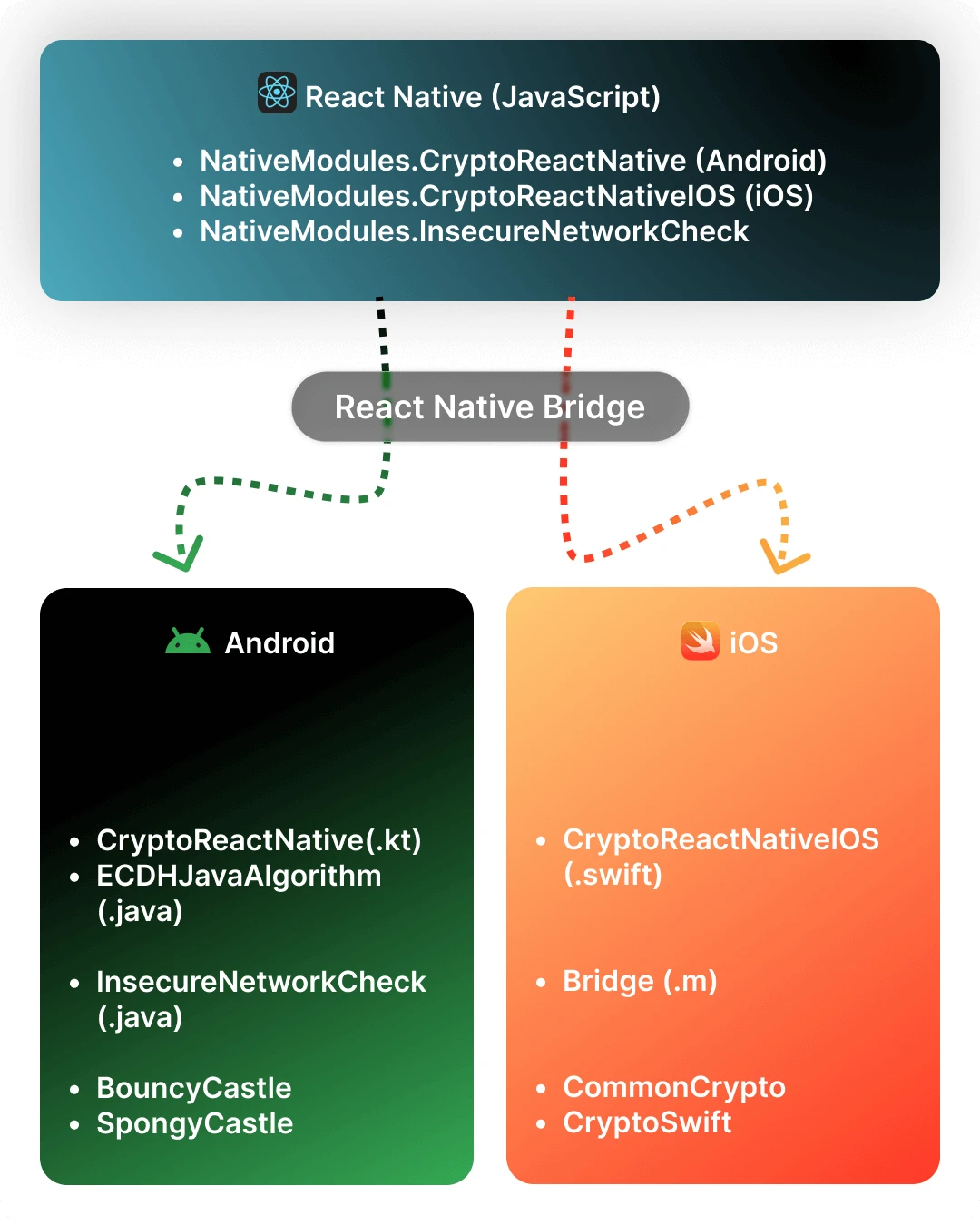
Architecture Overview
Wrapping Up
Building native modules isn't glamorous work, but for a fintech app handling real money, it's non-negotiable. The native crypto layer gives us confidence that card transaction data is encrypted with industry-standard algorithms before it ever leaves the device. The network security check adds a layer of protection against man-in-the-middle attacks on open networks.
If you're building a React Native app that handles sensitive data, don't shy away from native modules. The bridge ceremony (especially on iOS with Swift) is tedious, but the security and performance benefits are worth it. Start with a clear TypeScript interface for what you need, then implement it natively on each platform.
Built with React Native, secured with native code.